Reports
Reports screen reference
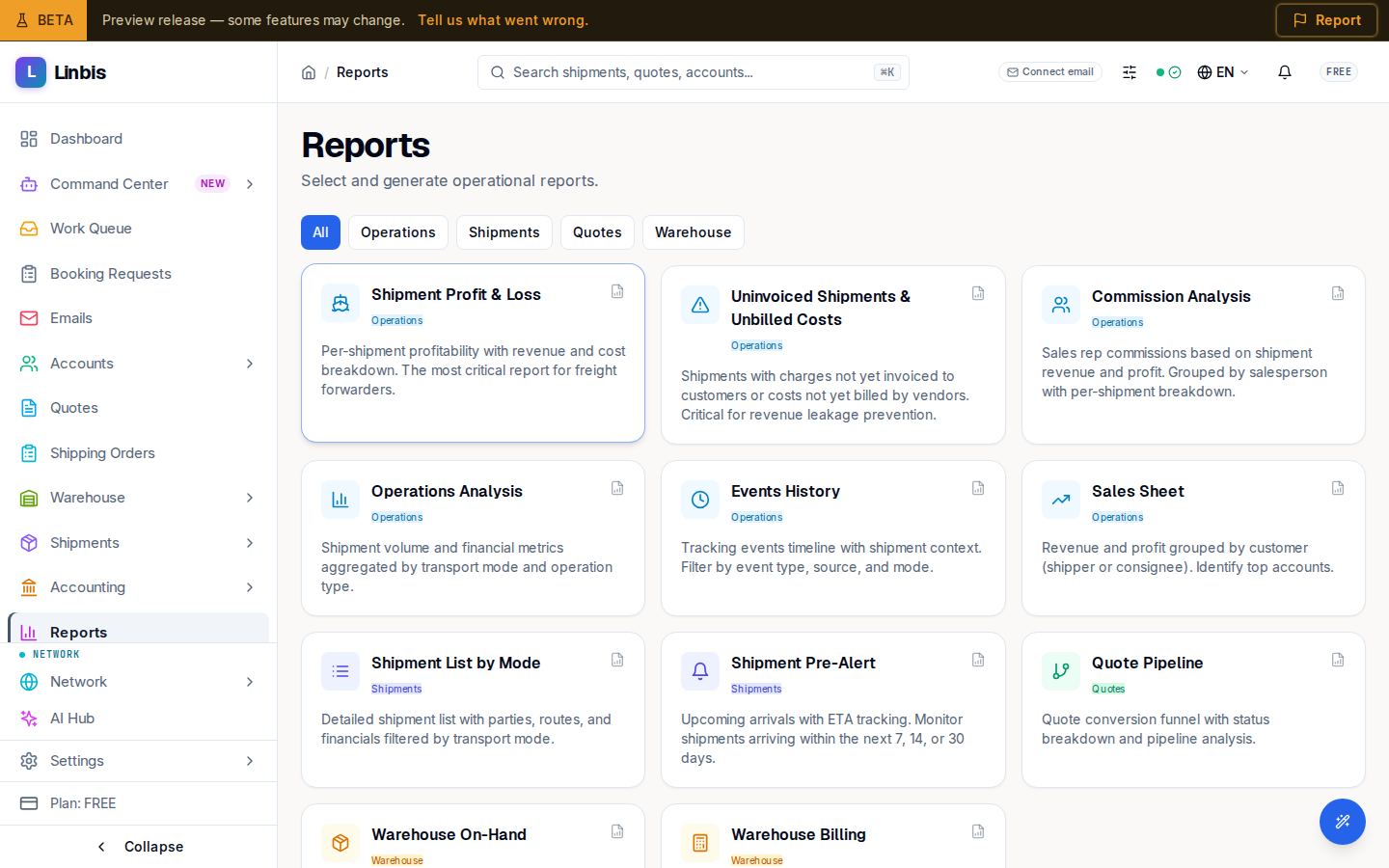
The report catalog — all 11 operational reports, their filters, summary cards, and the Print and Export controls.
Reports is a fixed catalog of parameterized operational reports — "Select and generate operational reports." Pick a card, set the filters, generate, then print or export. There is no free-form report builder; each report has its own filters and columns.
The catalog
Filter the cards by category — All, Operations, Shipments, Quotes, Warehouse — and pick a report:
| Report | Category |
|---|---|
| Shipment Profit & Loss | Operations |
| Uninvoiced Shipments & Unbilled Costs | Operations |
| Commission Analysis | Operations |
| Operations Analysis | Operations |
| Events History | Operations |
| Sales Sheet | Operations |
| Shipment List by Mode | Shipments |
| Shipment Pre-Alert | Shipments |
| Quote Pipeline | Quotes |
| Warehouse On-Hand | Warehouse |
| Warehouse Billing | Warehouse |
Shipment Profit & Loss is the flagship: "Per-shipment profitability with revenue and cost breakdown. The most critical report for freight forwarders."
Anatomy of a generator
Every report opens as a generator card (a Back to reports button returns to the catalog):
- Filters — typically From / To dates and Mode (All Modes, Air, Ocean, Ground, Multimodal), plus Sort By and Order. The Filters toggle reveals advanced criteria (Shipper, Consignee, Agent, Sales Rep, Origin, Destination). Shipment Pre-Alert uses a forward range instead (Next 7 Days, Next 14 Days, Next 30 Days); Warehouse Billing filters by run status (Draft, Approved, Invoiced, Voided).
- Generate Report — runs the query. Until then: "Configure the parameters above and click Generate Report."
- Header actions after generating: Print, Refresh, and Export with CSV, PDF, and Excel options. CSV and Excel download server-generated files; PDF opens the browser's print dialog (print to PDF).
- Summary cards on top of each result — for example P&L shows Shipments, Revenue, Cost, Profit, Margin.
Result highlights per report
- Shipment Profit & Loss — one row per shipment (Shipment, Mode, Lane, Shipper, Cargo, Revenue, Cost, Profit, Margin); rows expand into a Charge Breakdown with per-charge Sell, Cost, Profit and Invoiced / Billed flags.
- Uninvoiced Shipments & Unbilled Costs — chases revenue leakage: uninvoiced revenue, unbilled costs, days outstanding, and an Overdue (>30d) counter.
- Commission Analysis — per sales rep, expandable to the shipments behind each commission.
- Operations Analysis — volume and margin by mode and operation, with average transit.
- Events History — tracking events over a period (date, shipment, event type, location, source, status change).
- Sales Sheet — revenue, cost, profit, and margin by customer.
- Shipment List by Mode / Shipment Pre-Alert — shipment listings; Pre-Alert focuses on upcoming arrivals (ETD, ETA, Days Until).
- Quote Pipeline — quotes with conversion status and a Conversion Rate card.
- Warehouse On-Hand / Warehouse Billing — current inventory with days in warehouse, and storage/handling billing runs.