Accounting screen reference
The Accounting module map — overview, receivables, payables, general ledger, treasury, and settings.
Accounting covers the money side of every file: customer invoices (AR), vendor bills (AP), the general ledger, agent settlements, and bank/treasury. The sidebar groups it into Receivables, Payables, General Ledger, Agents & Commissions, Treasury, AI Automation, and Settings.
Overview page
The Accounting landing page shows the Current Period (with a Manage Periods shortcut — posting requires an open period), quick-link cards (Chart of Accounts, Periods, AR Invoices, AP Bills), and the two aging summaries: Accounts Receivable and Accounts Payable, each with a total, aging pills (Current, 1-30, 31-60, 61-90, 90+), and the open document count. Header shortcuts: New Invoice, Journal Entry, Generate Invoices.
Receivables
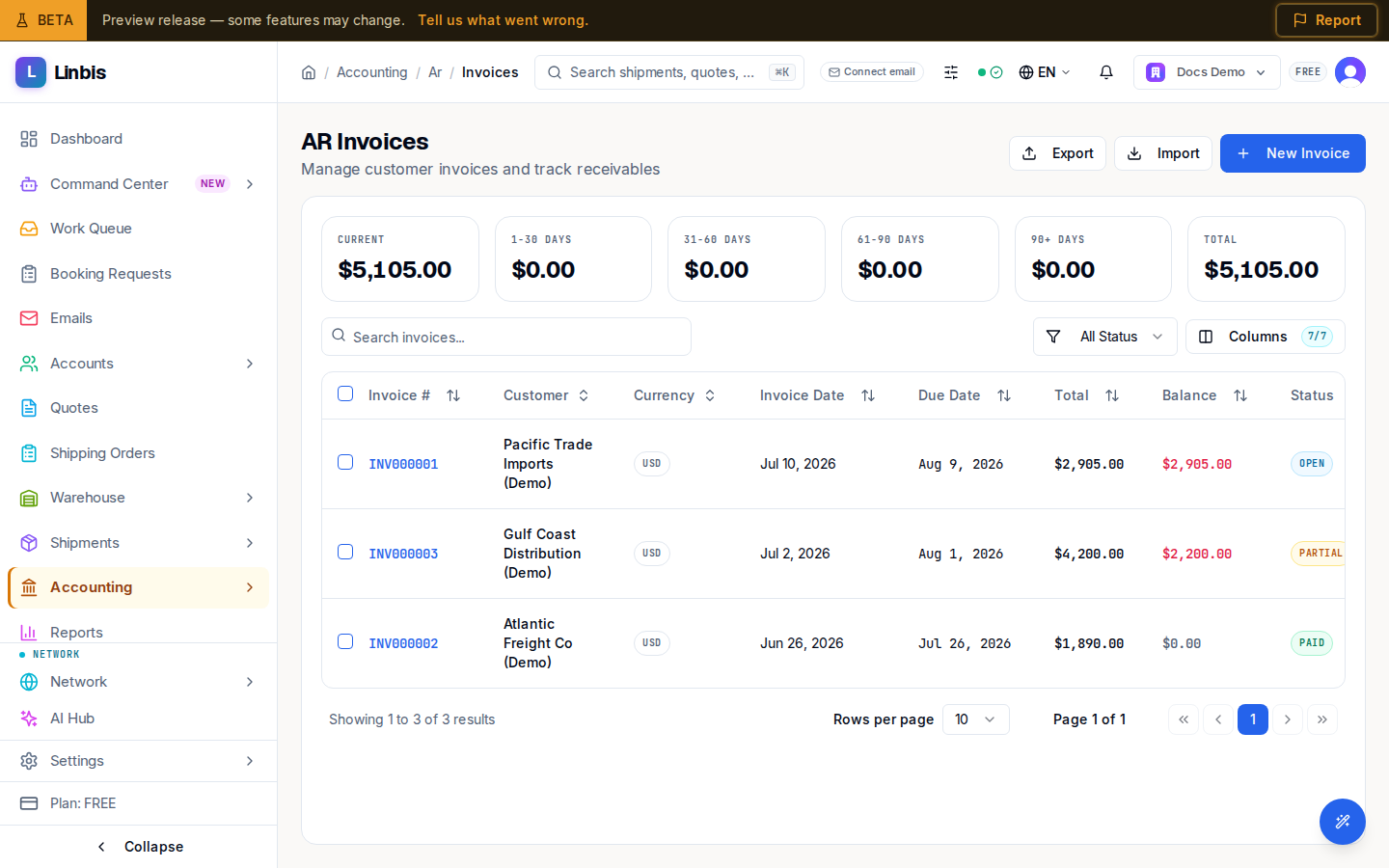
- Invoices — the AR invoice list with aging tiles (Current through 90+ Days and Total). Columns: Invoice #, Customer, Currency, Invoice Date, Due Date (overdue shown in red), Total, Balance, Status. Statuses: Draft → Open (posted) → Partial → Paid, or Voided. Row actions: View Details, Post Invoice (drafts), Download PDF, Void Invoice; bulk Post Selected. The invoice detail page has the tabs Line Items, Payments, Forms, Communications, and Activity, with actions Edit, Post Invoice, Send to Customer, Create Payment Link, Print / PDF, Void, Delete.
- Credit Memos — customer credits.
- AR Payments — Receive Payment records a customer payment (Payment Date, Payment Method, Reference #, Bank Account, Memo) and applies it to open invoices under Invoice Allocations, manually or with Auto-apply (FIFO). Overpayments can be kept as credit on account or recognized as income.
- Uninvoiced Charges — the batch invoicing queue; see Issue an invoice from charges.
Payables
Mirror of receivables for the vendor side: Bills, Vendor Credits, AP Payments (Pay Bills), and Unbilled Charges (batch Generate Bill).
General Ledger
Journal Entries, the Chart of Accounts, and the Trial Balance report.
Agents & Commissions
Agent Directory, Settlements, and CASS for air agents.
Treasury
Bank Accounts, For Review (imported bank lines awaiting matching), Bank Rules, and Payments.
AI Automation
AI Inbox — accounting documents the agent extracted (for example vendor bills) awaiting review.
Settings
Periods, Products & Charges, Tax Codes, Currency & FX, Integrations (QuickBooks connection), and the Setup Wizard. The company's accounting mode (QBO Only, Linbis GL, GL + QBO) is chosen in Settings → General.