Rate Intelligence screen reference
Every element of Rate Intelligence — the dashboard, rate cards, AI-extracted rate quotes, and where rates meet your quotes.
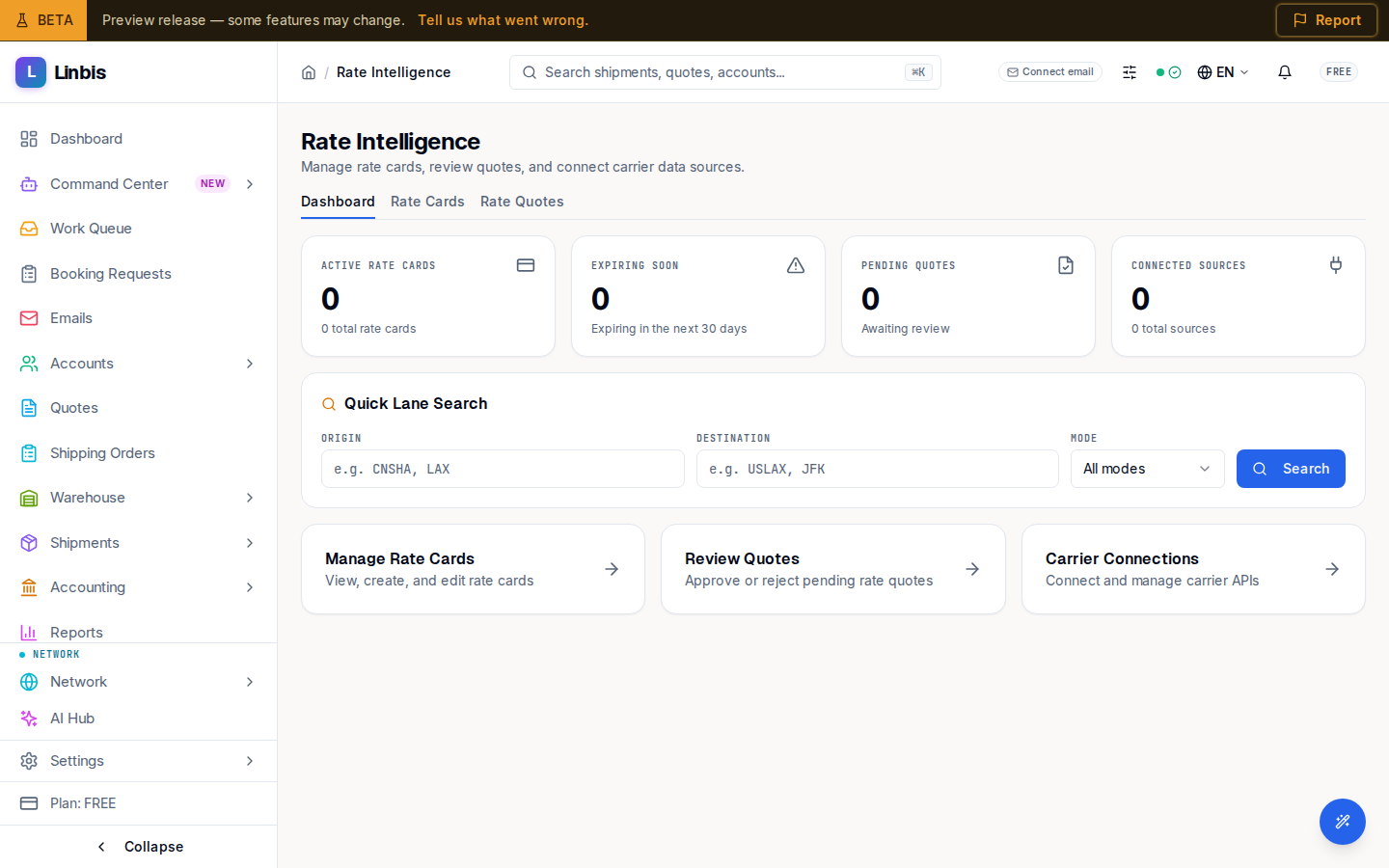
Rate Intelligence manages your buy-side rates: "Manage rate cards, review quotes, and connect carrier data sources." Three tabs — Dashboard, Rate Cards, Rate Quotes — plus an upload flow for rate documents the AI extracts.
Dashboard
- KPI cards: Active Rate Cards, Expiring Soon ("Expiring in the next 30 days"), Pending Quotes ("Awaiting review"), Connected Sources.
- Quick Lane Search — Origin ("e.g. CNSHA, LAX"), Destination, Mode, and Search, landing on the rate-card list filtered to that lane.
- Quick-action cards: Manage Rate Cards, Review Quotes, Carrier Connections.
Rate Cards
"Manage your rate cards, pricing, and contractual agreements."
- Status tabs with counts: All Cards, Active, Expiring 30d, Pending Approval, Draft, Expired, Archived.
- Header actions: Filters (Mode, Carrier, Origin Port, Destination Port), Export (CSV), Add Rate Card.
- Columns: Rate Card (name plus mode · source), Carrier, Lane, Validity (valid-from → valid-to), Status, Source. Sources: Manual, AI Extract, Contract, Spot, Browser, Carrier API, Template.
- Row actions: Edit, Archive, Delete; bulk Export CSV and Archive. Archiving warns: "Rate cards are not hard-deleted (audit-relevant)."
Add Rate Card opens a three-step wizard — see Create or edit a rate card. A submitted card waits in Approvals for sign-off — see Approve or reject a rate card.
Rate Quotes
"Review and manage AI-extracted rate quotes before conversion to rate cards." Rates arrive here from Upload Document (rate sheets, carrier emails) with a confidence score.
- Confidence tabs: All Quotes, Pending Review, High Confidence, Needs Attention, Converted.
- Columns: Quote ID, Lane, Carrier, Confidence, Status, Extracted, Source, and a Review action that opens the review sheet (View card once converted).
- Bulk: select rows and Auto-promote selected to convert high-confidence quotes into rate cards in one move.
Walkthroughs: Upload a rate document for AI extraction and Review AI-extracted rate quotes.
Settings
Rate Intelligence → Settings is now a redirect stub — "Carrier Connections Moved". Carrier API configuration lives in Settings › Integrations.
Where rates meet your quotes
The selling side lives on the quote itself: a quote's Best Rates tab ("Best Rates · AI Suggestions") lists matching carrier rates — cheapest flagged Best — each with an Apply button. See Apply a suggested rate to a quote.