AI Hub screen reference
Every element of the AI Hub — inbox automation stats, the trust ladder, auto-approve threshold, and the Agent Playbook with its per-type switches.
AI Hub is the analytics and configuration home for email inbox automation: "Email inbox automation analytics and configuration. Activity and trust below reflect inbox processing; AI cost and health are account-wide." A status pill next to the title reports Operational or Degraded (or Checking while loading). For live agent operations and approvals, the page points you to the Command Center.
Stats — Email inbox automation
Four tiles:
- Items Processed — inbox items today.
- Pending Review — awaiting your action.
- Auto-Processed — handled at high confidence without review.
- AI Cost — account-wide, this month.
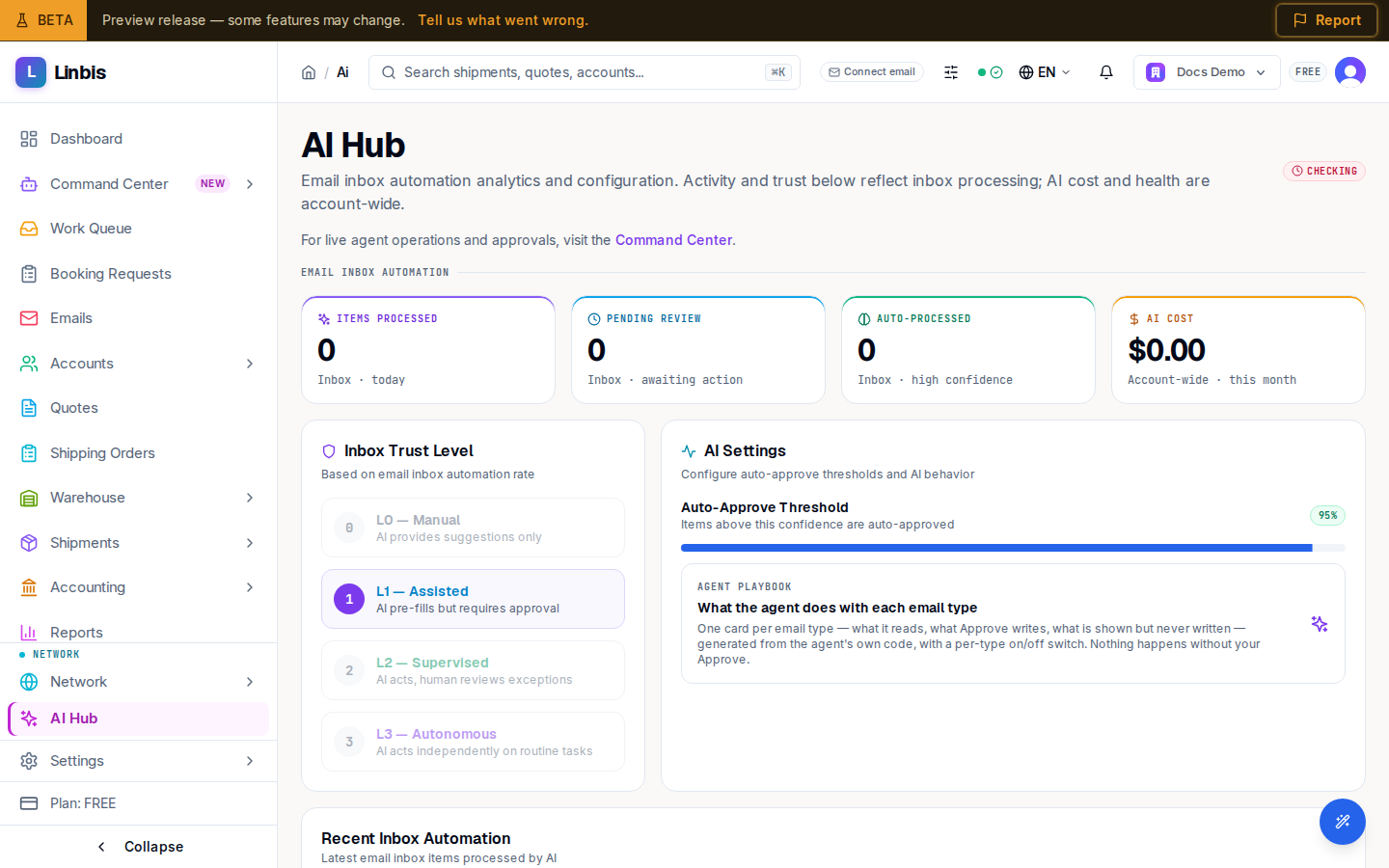
Inbox Trust Level
The autonomy ladder, "Based on email inbox automation rate":
| Level | Meaning |
|---|---|
| L0 — Manual | AI provides suggestions only |
| L1 — Assisted | AI pre-fills but requires approval |
| L2 — Supervised | AI acts, human reviews exceptions |
| L3 — Autonomous | AI acts independently on routine tasks |
AI Settings
"Configure auto-approve thresholds and AI behavior":
- Auto-Approve Threshold — "Items above this confidence are auto-approved" (shown with the current percentage, e.g. 95%).
- The Agent Playbook tile — "What the agent does with each email type" — opens the playbook page below.
Recent Inbox Automation closes the page: the latest AI-processed inbox items, with a View in Inbox link.
Agent Playbook
One card per email type, "generated from the agent's own code, so it always matches reality". Jump-nav groups: Bookings & shipments, Customs, Quotes & rates, Money, Requests & inquiries, Other. A counter tracks how many types are enabled, with the reassurance "Turned-off types stay visible in your inbox — they are never silently dropped."
Each card ("Booking request", "Arrival notice", "Vendor bill", "Complaint / claim"...) shows:
- Badges: Requires your Approve or Read-only, Never auto-applies, and Money on financial types.
- The behavior sections "When it arrives:", "How I match:", "When you Approve:", plus collapsible field lists of what is written on Approve and what is shown but never written.
- An On/Off switch (top right) — admins only; others get "Only an admin can change agent toggles." Off means emails of that type are still classified and visible, but the agent writes nothing.
The footer promise on non-auto types: "I never write anything without your Approve."