Chart of Accounts
Your general ledger account structure — QuickBooks-style sections, account numbers, balances, and edit/deactivate actions.
Accounting → General Ledger → Chart of Accounts is your account structure ("Manage your general ledger account structure") — every account that invoices, bills, payments, and journal entries post to.
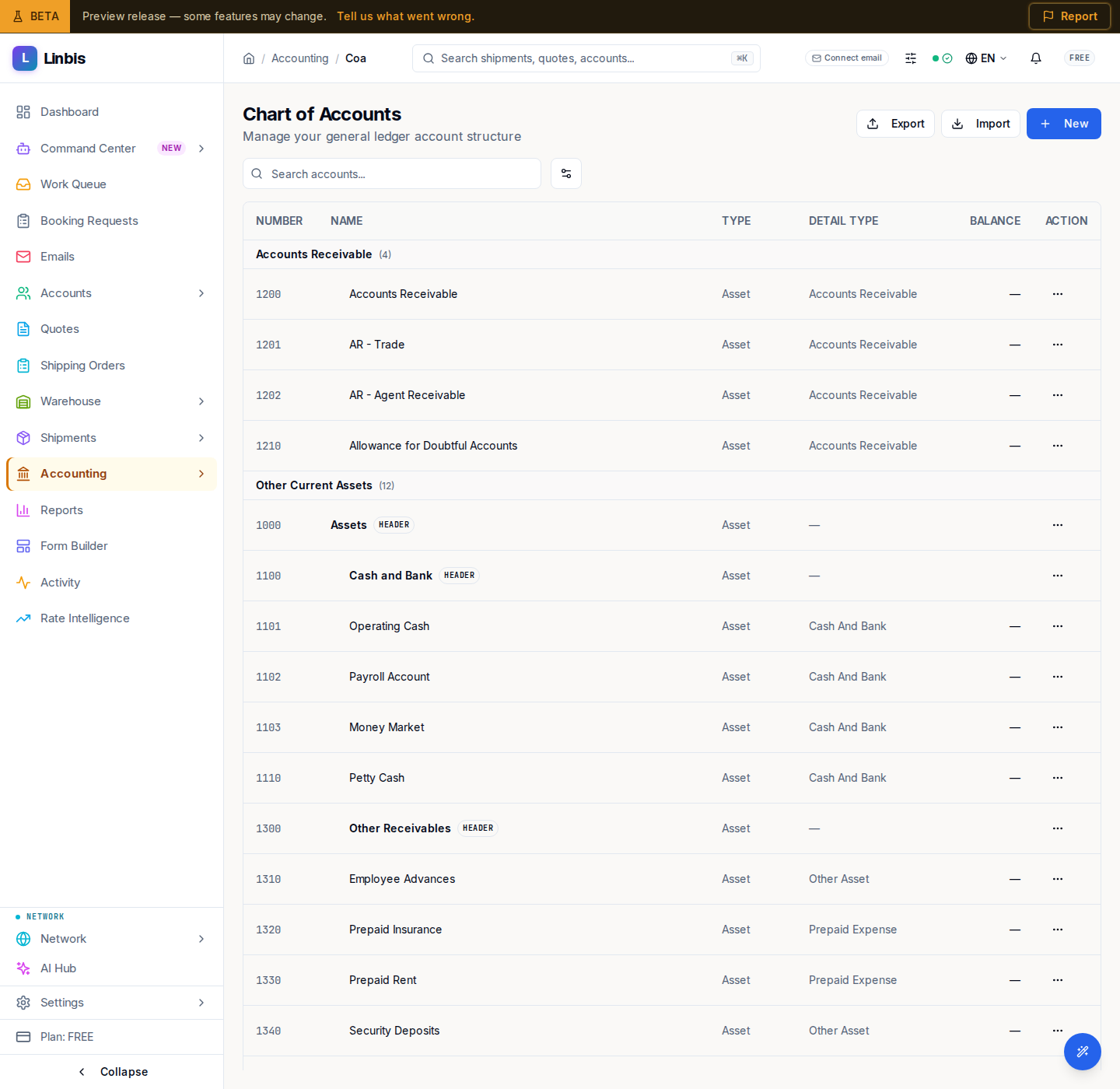
Layout
A QuickBooks-style flat table with the columns NUMBER, NAME, TYPE, DETAIL TYPE, BALANCE, ACTION, grouped into sections: Bank, Accounts Receivable, Other Current Assets, Fixed Assets, Accounts Payable, Credit Card, Other Current Liabilities, Long-Term Liabilities, Equity, Income, Cost of Goods Sold, Expenses, Other Income, Other Expense.
Toolbar
Search with "Search accounts..."; the gear menu toggles Show account numbers and Include inactive accounts.
Actions
- Header: New opens the account sheet (number, name, type, detail type); Export / Import.
- Row menu: Edit, and Make Inactive (or reactivate) — accounts are deactivated, never deleted, so history stays intact.
Starting from scratch? The Setup Wizard imports a full freight-forwarding template in three steps.